

Tile Calculator
Calculating Tiles Online with Apollo Tile is Easy
Planning to transform your interiors with our stunning collection of large or small format tiles? Eliminate the guesswork from your tiling project using our nifty tile calculator to work out the quantity needed to be installed in your space. This tool is efficient and user-friendly, designed for precise floor and wall calculations for living room, kitchen, bathroom, and outdoor spaces in both residential and commercial properties. Start by measuring the length and width of the area and then enter your measurements into our calculator to quickly determine exactly how many tiles you need for your space. Save time, avoid shortages, and complete your project with confidence!
How Our Wall & Floor Tile Calculator Works
Planning ahead is important for the success of any project. While taking on a tile installation project is exciting, it can quickly turn overwhelming if you’re unsure of the numbers. There are a couple of reasons for this. Our tiles come in many sizes and can be installed in different patterns, so estimates for the number of pieces to complete a space aren’t always straightforward.
With Apollo Tile’s floor and backsplash calculator, tile estimates are simple once you have a few pieces of basic information. Built for DIY homeowners and professional installers, this handy tool lets you input the dimensions of the area to be tiled (width and length). It then takes care of the calculations to provide you with the total square footage (sq ft) of the area, the number of cases required, and the cost.
To ensure you’re starting off with enough tiles, we recommend ordering an extra 10% on top of your calculated needs. This will cover cutting mistakes, breakage, or future repairs to maintain color consistency. If you’re planning for a complex layout, consider increasing the percentage. The best part? Our floor tile calculator has an option to include overage so you don’t have to guess. Knowing you have enough material on hand lets you focus on a quality installation, not last-minute reorders.
Key Benefits of Apollo Tile’s Tile Calculator
-
Accurate calculations for all tiles: Our easy-to-use online tool allows you to quickly generate accurate calculations for various tiling materials, including natural stone and glazed ceramic tile. With the right figures, you minimize the risk of underbuying (which interrupts work).
-
Time-saving and easy-to-use tool: Whether tiling a floor or backsplash, a square foot tile calculator gets you real-time results, allowing for prompt decision-making and execution.
-
Cost-effective and budget planning: When you know how many tiles you need from the get-go, it makes it easy to plan smarter, optimize your budget, and eradicate overspending.
-
Versatile for all spaces: Ideal for residential and commercial settings. With our free tool, you can work out estimates for different areas, including the shower wall, kitchen backsplash, patio floor, or pool water line.
-
Built for DIYers and professionals: Our useful tile calculator supports homeowners tackling DIY projects, designers estimating material needs, and expert tile setters preparing accurate job bids. Whether you’re working on a residential or commercial project, our calculator is an indispensable tool designed to save you time and money.
How to Use Our Online Tile Calculator
To harness the functionality of Apollo Tile’s tile calculator, consider the following steps:
- Use a tape measure to measure the widest and longest points of the area to be tiled (width and length).
- When there is more than one area or the area has an irregular shape, divide it into smaller sections (rectangles or squares). Measure width and length of each section.
- Input these values into our online calculator. There is an option to add as many sections as needed. Select the recommended 10% overage amount for cuts and waste.
- The tile calculation will do the math and provide the area’s square footage.
Example:
Width × Length = Total Area
Floor size: 8 ft 7 in × 5 ft 2 in = 44.36 sq ft
Add 10% Waste: 44.36 × 10% = 4.44 sq ft
Total Tile Needed:
44.36 sq ft + 4.44 sq ft = 48.80 sq ft
A 49 sq ft floor area will require 4 cases of our Moss Green 24x24 Natural Square Porcelain Large Format Tile. Please note that the number of cases needed varies from product to product, as each tile has a different square footage coverage per case. To ensure accuracy, we recommend checking the “sq ft per case” detail listed on the specific product page before placing your order.
Tile Calculator for Different Spaces
Whether installing tile around the fireplace, on bathroom floors, or on the kitchen backsplash, accurate measurements are crucial. Find examples for specific areas below:
Kitchen Backsplash: Tile for the backsplash typically goes on the wall from the countertops up to the upper cabinets or ceiling. It can also be installed behind the stove or sink to provide a splashproof and heat-resistant surface. While large and mid-sized formats work well, mesh-backed mosaics are a coveted choice for adding intricate detail.
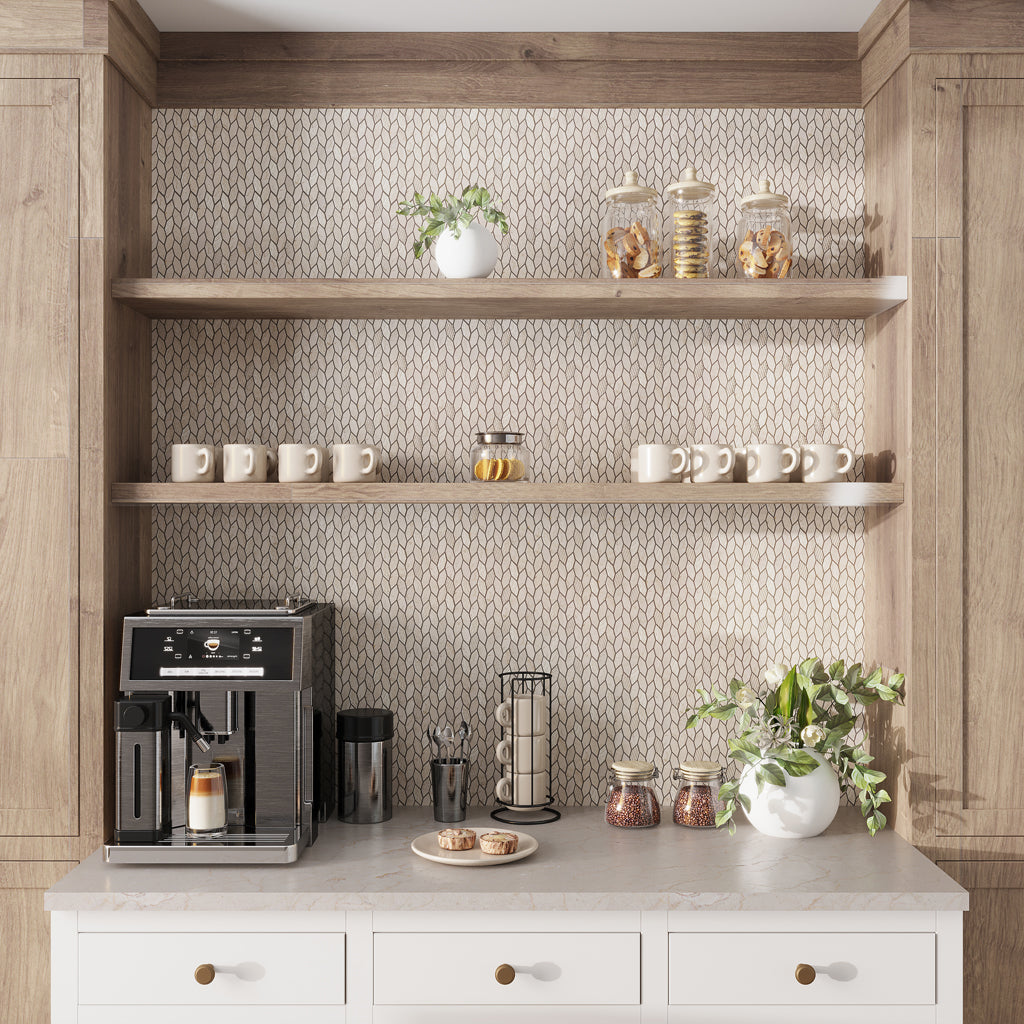
Assuming you have a rectangular area and want to install Beige 12x12 Etched Polished Hexagon Crema Marfil Marble Mosaic Tile. Measure the height and length and use our mosaic tile calculator to input the value for both. Get the results for the total square footage, the number of cases needed to tile the area, and the cost.
Example:
Height × Length = Total Area
Backsplash size: 10 ft 6 in × 6 ft 4 in = 67 sq ft
Add 10% Waste: 67 × 10% = 6.7 sq ft
Total Tile Needed:
67 sq ft + 6.7 sq ft = 73.7 sq ft
Recommended Order: 74 sq ft (rounded up)
Fireplace Surround: To install White 24x24 Honed Terrazzo Large Tile on a fireplace surround as illustrated in the image, divide the area into 3 separate rectangles. Next, measure the length and height of each section. Use our wall tile calculator to add 3 sections, and input the measurements to get the total square footage, the number of cases required, and the cost.
Example:
Step 1: Enter Each Section into the Tile Calculator
Section 1: 8 ft 7 in × 5 ft 2 in = 44.36 sq ft
Section 2: 5 ft 4 in × 5 ft 4 in = 28.44 sq ft
Section 3: 8 ft 7 in × 3 ft 2 in = 27.21 sq ft
Step 2: Add the Total Area
Total Area:44.36 + 28.44 + 27.21 = 100.01 sq ft
Step 3: Add 10% Waste 100 × 10% = 10 sq ft
Total with Waste: 100 + 10 = 110 sq ft

*The number of cases required depends on the product’s sq ft coverage per case. Always check the product page for exact coverage details.
Bathroom Wall and Floor: A tiled bath space can be great for staging a tranquil oasis. But how many tiles will you need? Using our Alabaster White 24x48 Lappato Porcelain Large Format Tile on the floor and bathtub surround, measure the length and width of the floor and the length and height of the wall. Enter the dimensions to calculate the overall square footage, the number of boxes, and the cost.
Example:
Floor size: 8 ft 7 in x 6 ft 4 in
Wall size: 8 ft 7 in x 3 ft 2 in
83 sq ft + waste (83 + 10%) = 91.30 sq ft
91.30 sq ft = 6 cases
Understanding Installation & Labor Costs Alongside Tile Quantity
Tile quantity in a box varies depending on its size, but each case clearly lists the total square footage it covers. For example, a box of 24×24-inch tiles might include 12 pieces, while a box of smaller 12×12-inch tiles may contain 9 pieces.
Knowing how much tiling material you require is only part of a bigger puzzle. Tile installation cost is another factor to keep top of mind, as it varies based on the type of material, layout complexity, and labor rates (if professional help is enlisted).
We also recommend reading our guide on tile labor cost per square foot, which explains in detail what impacts pricing and how you can manage and reduce expenses.
Order Your Tiles Online with Confidence
We are here to make your tile-purchasing journey a delightful experience. Whether you’re a homeowner tackling a simple task or a pro managing several sites, our invaluable calculating tool provides the accuracy you need to plan your budget, maximize productivity, and complete your tiling endeavors with ease. Below is how one of our customers turned their renovation into a success:
“When renovating the bathroom for one of my rental properties, I thought I could ‘eyeball’ the tile quantity. Halfway through installation, everything that could go wrong went wrong: I ran out of tile. What was meant to be a weekend project turned into a two-week delay, extra costs, and color variation was noticeable.
For my recent remodel, I relied on Apollo Tile’s tile calculator to get the accurate number of tile cases needed. It’s super easy to use and accounts for overage, saving me time, money, and stress. I ordered the right number of tiles the first time, and I even have spares from the same batch just in case I ever need them down the line.”
Frequently Asked Questions
1. What is a wall or floor tile calculator?
2. How do I calculate the total square footage of the area to be tiled?
3. Does the tile calculator account for tile cuts and waste percentage?
4. Does a floor and backsplash tile calculator work for any tile type?
5. How accurate is Apollo Tile’s tile calculation tool?
6. Can I calculate how many cases I’ll need for an outdoor space?
7. Can I also calculate grout and adhesive quantities?
8. Can I get a tile quotation based on the calculator results?
Yes, after calculating the required quantity, you can contact our team at 415-316-0898 or email info@apollotile.com to receive a quotation. This will help you plan within your budget.